
Server for 10-20 Users in UAE: Choose the Right Server for Your Business
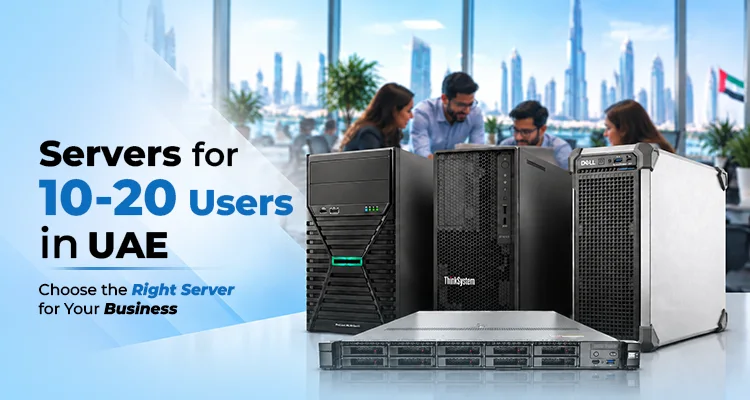
Are you confused about which servers are best for your small business? A small team doesn't mean limited IT requirements. You must consider certain factors to choose the right servers for 10-20 users in UAE. Your employees may need to handle multiple files, business applications, databases, backups, and other systems that require a server that offers high performance. Choosing a server only based on the number of employees is not practical; the server should also match your workload, storage needs, applications, and future expansion plans. Let us see the best servers for 10-20 users for your organisation in Dubai.
What Server Do You Need for 10–20 Users?
Selecting a server for 20 users is not just about finding a server for the exact staff count. You have to consider various factors to ensure that the server aligns with your workloads and requirements. Before choosing a server, consider these factors:
- Identify the needs: Check whether the server can handle file sharing, run business applications, and manage a database for around 10-20 users or more.
- Processor: Consider a processor with more cores and stronger processing performance to easily manage a larger number of applications.
- RAM capacity: Choose servers with 16-32 GB of RAM capacity for basic file management tasks and 32-64 GB for application-heavy environments.
- Storage capacity: Higher-capacity Hard Disk Drives (HDDs) may be suitable for storing documents, and Solid State Drives (SSDs) can provide faster access to various business applications.
- Virtualization requirements: Ensure that the servers allow running multiple virtual machines on the same physical server for 10-20 users.
Server Models for 10–20 Users in UAE
Companies with 10-20 users need a server that provides enough processing power, memory, and storage to handle daily workloads without any disruptions. The following server models from Dell, HPE, Lenovo, and xFusion offer server configurations that can support small-office and growing-business environments.
HPE ProLiant ML30 Gen11
HPE ProLiant ML30 Gen11 tower server consists of 128 GB DDRs standard memory. This allows companies with 10-20 users to run multiple files, business applications, and other office services from one server.
- Affordable server for SMBs and remote offices
- HPE iLO Silicon Root of Trust delivers enterprise-class performance, security, and expandability at a low cost.
- Supports easy upgrades with SAS controllers as your business grows.
Lenovo ST50 V3
Lenovo ThinkSystem ST50 V3 is a tower server that helps businesses manage IT tasks ranging from basic file sharing to business applications. This is a suitable option for small and growing businesses and remote offices. Moreover, the Lenovo ThinkSystem server is flexible to configure memory for multiple business applications, shared files, and other workloads.
- xClarity controller enables deployment and system management.
- Intel Xeon E-2400 and Xeon 6300 series processor options help you to manage file sharing, databases, and other business applications.
- Supports 3.5-inch HDDs or SSDs that can store application data and shared documents.
Dell PowerEdge T160
The Dell PowerEdge T160 is built with processors, flexible storage configurations, iDRAC 9 management, and security features. For companies with 10–20 employees, the Dell PowerEdge T160 combines a single-socket tower design with integrated management through iDRAC9. IT administrators can remotely monitor server health, check hardware status, manage power and boot functions, and handle maintenance tasks. These features can help small businesses identify hardware issues early and reduce the need for frequent physical access to the server.
- 128GB ECC DDR5 memory helps you to manage multiple services.
- SAS/SATA HDD drives or NVMe drives in the Dell T160 allow faster application access.
- The storage controller helps businesses analyse storage redundancy and save space.
xFusion 1158H V7
FusionServer 1158H V7 can manage simple AI tasks, cloud computing, virtualisation, and other complex workloads. This Fusion server is useful for organisations that need high computing density and simplified server operation. For companies looking for xFusion servers for 20 users, the 1158H V7 model provides enough processing, memory, storage, and expansion capacity to meet their actual requirements.
- The AMD EPYC 9004 Series processor in the 1158H V7 allows several employees to access business applications, databases, or other services at the same time.
- The server has 24 DDR5 memory slots with speeds up to 4800 MT/s, which gives enough flexibility to support current applications. As workloads grow, businesses can add more memory to support increasing demands.
- SAS, SATA and NVMe drives in this Fusion server allow businesses to use higher-capacity drives for shared files and data.
| If your company needs | Consider |
|---|---|
| File sharing, office applications and basic server workloads | HPE ML30 Gen11 |
| A compact server for a small or remote office | Lenovo ThinkSystem ST50 V3 |
| Flexible storage + multiple business services | Dell PowerEdge T160 |
| Virtualization, databases, heavier workloads and greater expansion | xFusion FusionServer 1158H V7 |
Where Should You Buy Servers for 10-20 Users in UAE?
Purchasing a server for a small or large business requires considering various factors. Buying servers in UAE from a trusted server supplier like Infome Technologies, with more than 10 years of industry experience, helps you receive the best solution with expert advice and after-sales support. Moreover, Infome has been recognised as an authorised partner of top server brands such as Dell, HPE, and Lenovo. Our industry experts, with hands-on experience, understand your exact needs and help you choose the best server for 20 users in Dubai and across UAE, Middle East, and Africa, based on your budget and workload.
A 10-20 staff company does not need a heavy server with strong specifications; however, choosing a basic server might limit the team's performance as your applications, data, and business needs grow.
Before buying a server, look at what your employees do every day. Do they mainly share files and access office applications? Do they work with databases, ERP systems, virtual machines, or large amounts of business data? How much storage do you need today, and how much could you need as your team grows?
The right server should provide enough processing power, RAM, storage, security, and expansion capacity for your current workload and for future needs.
The right server is the one that fits your workload, not just your headcount. If you are looking for servers for 10–20 users in UAE, Infome Technologies can help you compare server configurations from leading brands such as Dell, HPE, Lenovo, and xFusion based on your workload, applications, storage requirements, budget, and plans. Contact our team to discuss your requirements and choose a server configuration that fits your business.
Frequently Asked Questions and Answers
-
How much does a server for 10–20 users cost in UAE?
The cost depends on the processor, RAM, storage, operating system, warranty, and services. Request a configuration-specific quotation to learn more about the price details. -
Which server is suitable for 20 users?
HPE ProLiant ML30 Gen11, Dell PowerEdge T160, Lenovo ThinkSystem ST50 V3, and xFusion 1158H V7 servers can handle file sharing, various business applications, and AI workloads for 20 or more users. -
Can a server for 10–20 users handle AI workloads?
Yes. If you want to run AI workloads with other files, applications, databases, or supporting services, choose a server with more RAM, storage, and GPU acceleration. Clearly explain your AI workload requirements and then select the solution that matches your needs. -
How much RAM does a server for 10–20 users need?
A basic environment may work with 16–32 GB of RAM, while application-heavy environments may require 32–64 GB or more. Database workloads, virtualization, and multiple applications can increase memory requirements. Check the RAM requirements of your business applications before finalising the server configuration. -
Can one server handle file sharing, business applications, and backups?
Yes, one server can handle file sharing, business applications, and backups when it has enough hardware and software configuration support. You have to calculate the combined CPU, RAM, storage, and network demand before choosing the configuration.
About the Author

The CEO and Co-Founder of Infome, with over 18 years of working experience in IT infrastructure and identification solutions. He shares valuable insights regarding enterprise technology and security systems.
Servers for 200 Users in UAE: How to Choose the Right Server for Your Business
Choosing the right server for 200 users in UAE requires more than counting employees. Your organisation's applications, workload, data volume, security requirements, and future growth all influence the server configuration you need.
Read Article
Servers for 100 Users in UAE: Choose the Best Server for Business in UAE
A company with 100 or more users needs a server that supports them in numerous operations.
Read Article
Server for 50 Users in UAE: A Practical Guide to Choosing the Right Server
Selecting a server for 50 users in UAE needs careful thinking about the daily business requirements and business size. Employees may need to run various files, software, and applications and access data at the same time. Hence, choosing the best server for your small business in Dubai must align with your current requirements and future growth plans. For a business with 50 staff, the right server can make every day's work more organised
Read Article
Need the Right Solution for Your Business?
Our experts will guide you to choose the best Servers & Storages that fits your needs and budget.
Servers for 200 Users in UAE: How to Choose the Right Server for Your Business
Choosing the right server for 200 users in UAE requires more than counting employees. Your organisation's applications, workload, data volume, security requirements, and future growth all influence the server configuration you need.
Read Article
Barcode Scanners vs Mobile Computers in UAE: Choose the Right Solution for Your Business
Businesses that manage inventory, product tracking, and daily operations need an efficient barcode scanner and mobile computer.
Read Article
A Day for Fitness, a Step Towards a Healthier Tomorrow
Physical fitness and mental well-being are the core factors for a healthier lifestyle. By considering this, Infome launched an app, InfomeFit, and conducted a health session to strongly support this message.
Read Article